
Google Ads can tell you that your ads drove 40 phone calls last month. What it can't tell you on its own is which of those calls were real customers, which were wrong numbers, and which turned into paying work. For a law firm, a clinic, a B2B supplier, or any business that sells by phone, that's the number that actually matters.
The good news is that Google Ads keeps a record of every call. This guide shows you where to find it, how to export it, and how to turn it into a simple pipeline so you can see which calls became customers.
What the Call Details Report Shows
The call details report lists every phone call that came from your ads, one row per call. Depending on your account and country, it includes:
- Start and end time: exactly when each call came in.
- Duration: how long the call lasted, so you can spot hang-ups and real conversations.
- Caller area code and phone number: where the call came from, and the caller's number where Google provides it.
- Status: whether the call was received or missed.
- Call source: whether the person called from the ad itself or from your website after clicking an ad.
- Campaign and ad group: which part of your account drove the call.
- Recording: a link to listen to the call, if call recording is turned on.
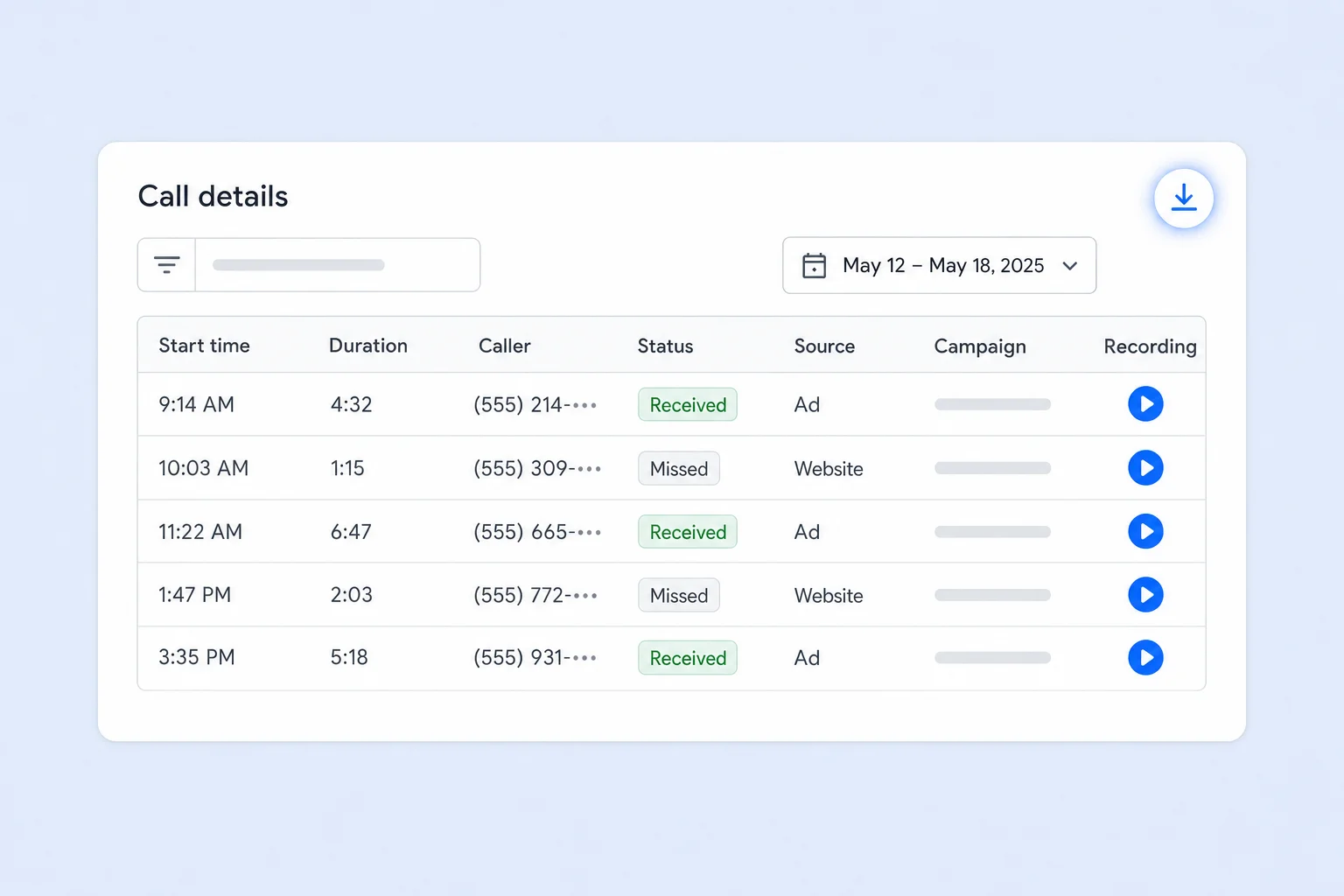
Calls only show up here if call reporting is set up. If you haven't done that yet, start with our guide to tracking phone calls in Google Ads.
How to Open the Call Details Report
- Go to the Report editor: in Google Ads, click Campaigns, then Insights and reports, then Report editor.
- Open Call details: in the list of predefined reports, choose Call details.
- Set your date range: pick the period you want to review, such as last week or last 30 days.
- Add the columns you need: make sure caller phone number, duration, status, call source, campaign, and recording are showing.
- Save the report: save it with a clear name so you can open the same view each week with one click.
Turn On Call Recording
Recordings are the fastest way to know what actually happened on a call. In your account settings, open Call reporting and turn on call recording. Google plays a short notice to callers letting them know the call may be recorded. Call recording isn't available in every country.
Recordings don't stay in Google Ads forever. Older calls show as expired, so review your calls every week instead of waiting until the end of the quarter.
Export Your Calls to a Spreadsheet
The report is great for looking up calls, but it has no place to write down what happened. That's where a spreadsheet comes in.
- Download the report: click the download icon at the top right of the report and choose CSV or Google Sheets.
- Add the calls to your call history sheet: paste the new rows under last week's calls, keeping the same column order every time.
- Skip duplicates: if a call is already in the sheet with the same start time, duration, and phone number, don't add it again.
Add a Pipeline Status to Every Call
This is the step that turns a list of calls into a sales pipeline. Next to the columns from Google Ads, add three of your own: a pipeline status, an amount, and notes. The pipeline status is a dropdown with a short, fixed list of options:
- Not reviewed: the default for every new call until someone checks it.
- Not a customer: wrong numbers, job seekers, vendors, spam, and people outside your service area.
- Requested pricing or estimate: a real lead who asked for a quote but hasn't bought yet.
- Closed deal - won: the call turned into a sale or booked job. Put the value in the amount column.
- Existing customer inquiry: a current customer calling about an order, appointment, or bill.
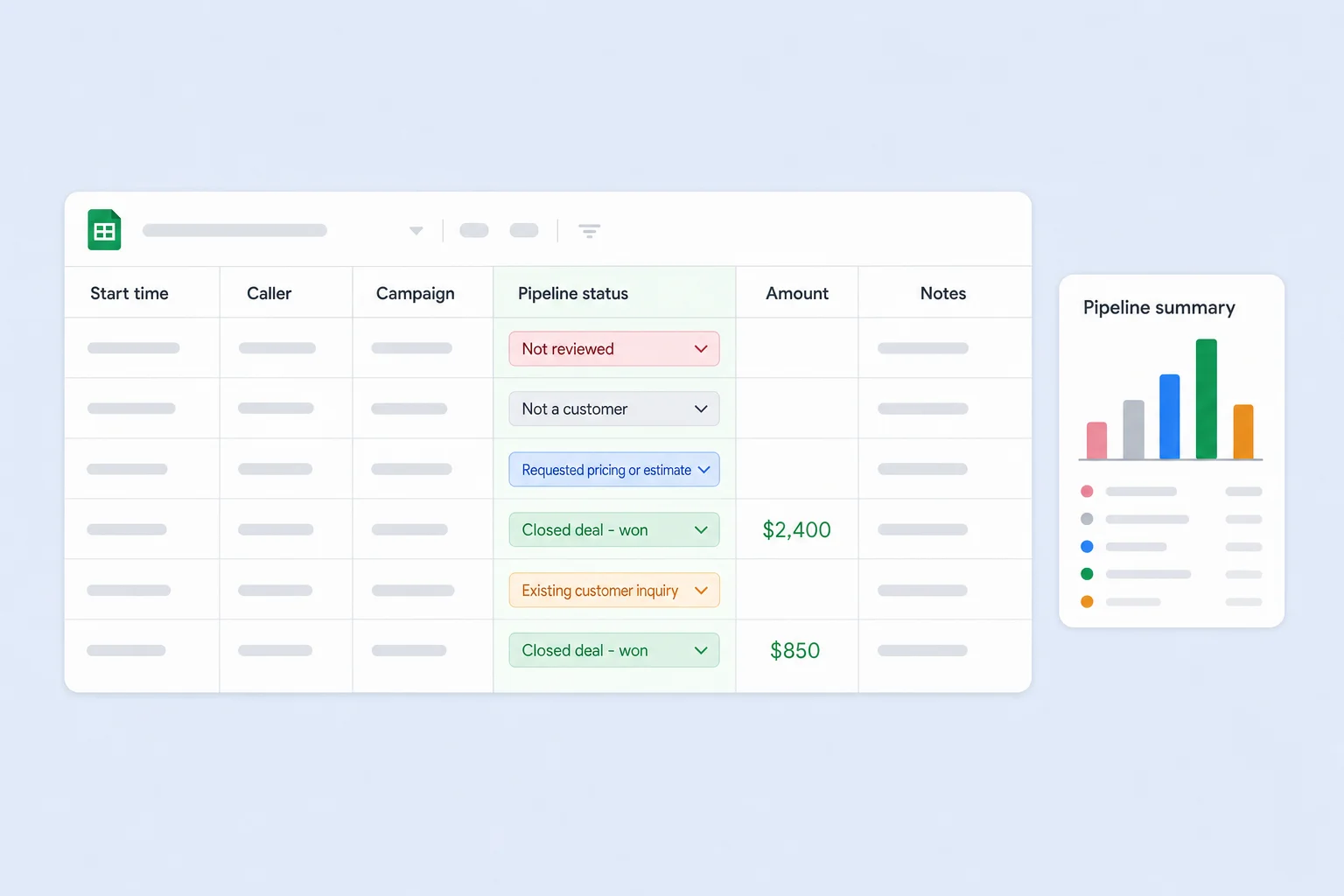
To fill in the status, listen to the recording or look up the caller's number in your CRM or booking system. Add a short note so anyone on your team can see what the call was about. Color each status in the dropdown so you can scan the sheet at a glance.
What the Pipeline Tells You
Once every call has a status, a simple summary tab that counts each status turns the sheet into a real report. You can see:
- How many calls were real leads: often far fewer than the conversion count in Google Ads, because hang-ups, wrong numbers, and current customers get counted too.
- Your true cost per lead: divide ad spend by the number of real leads instead of total calls.
- Revenue from ad calls: add up the amounts on closed deals and compare them to what you spent.
- Which campaigns bring in customers: since every call has a campaign, you can see which ones drive closed deals and which mostly bring junk calls.
That's the information you need to decide where to spend more and what to cut.
Final Thoughts
The call details report shows every call your ads produced. A call history spreadsheet with a pipeline status shows which of those calls made you money. Open the report, export your calls every week, and give each one a status. It only takes a few minutes, and it changes how you judge your ads.
At Uppertier Marketing, we set up a call history sheet for every client, add new calls every day, and review each call so the pipeline status is already filled in. If you want to know which of your ad calls are turning into customers, schedule a call with our team.


