
Shopping Feed Optimization: How to Improve Your Product Feed
How to optimize product titles, images, GTINs, and reviews in your shopping feed, and fix Merchant Center issues.
Your product feed is the foundation of every Shopping ad, Performance Max campaign, and free listing you run on Google. Google doesn't write your ads from scratch. It pulls the title, image, price, and details straight from the feed you send to Google Merchant Center, and it uses that same data to decide which searches your products show up for.
That means two stores selling the same product at the same price can get very different results. The one with the clearer titles, better images, and more complete product data usually wins more impressions and more clicks for less money. This guide covers what to optimize in your feed and how to keep Merchant Center healthy.
Why Shopping Feed Optimization Matters
Shopping campaigns don't use keywords. Google reads your feed to understand what each product is, then matches it to what people search for. A thin or messy feed leaves Google guessing, and that leads to fewer impressions, irrelevant clicks, or products that never show at all.
A well-optimized feed helps you:
- Show up for more specific, high-intent searches
- Earn a higher click-through rate with clearer titles and images
- Avoid disapprovals that pull products out of your campaigns
- Group products for smarter bidding and reporting
Product Titles
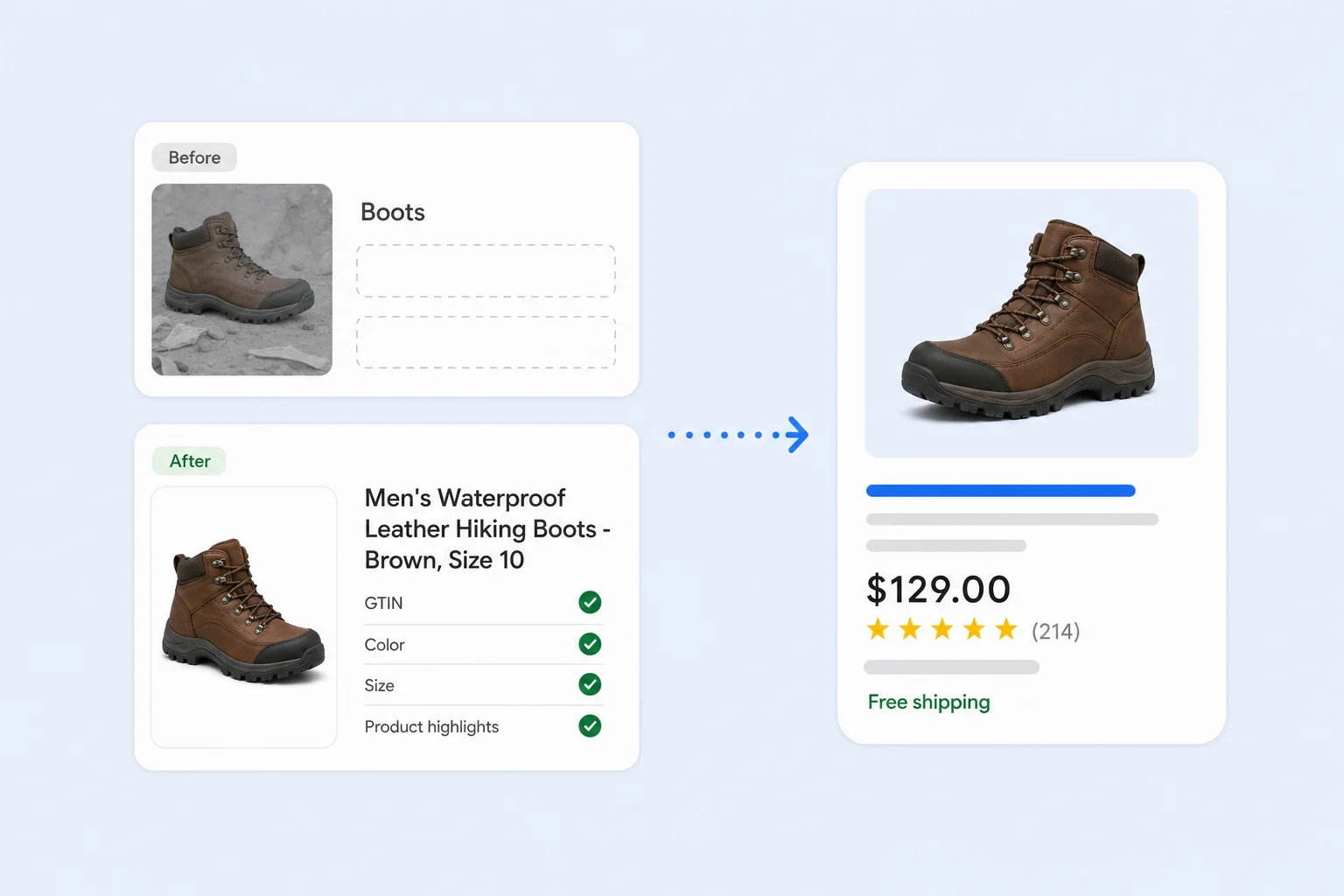
The title is the most important field in your feed. It carries the most weight for matching searches, and it's the first thing shoppers read. Google allows up to 150 characters, but only the first part is shown in most ads, so put the most important words up front.
- Ecommerce apparel: Brand + Gender + Product type + Material + Color + Size, such as "Men's Waterproof Leather Hiking Boots - Brown, Size 10."
- Electronics: Brand + Product line + Model + Key spec, such as "27-Inch 4K Monitor with USB-C, 144Hz."
- Home and furniture: Product type + Material + Style + Dimensions, such as "Solid Oak Dining Table, Mid-Century, 72 x 36 in."
- B2B and industrial: Product type + Spec + Part number, such as "Stainless Steel Hex Bolts, 3/8 in x 2 in, 50-Pack."
Use the words your customers actually search for. Your search terms report is the best source. If shoppers search "running shoes" and your titles say "athletic footwear," you're missing matches. Avoid all caps, promotional text like "Best Deal" or "Free Shipping," and keyword stuffing, since these can cause disapprovals.
Product Descriptions
Descriptions give Google more context about your product, and they can show on your free listings and product pages in Google. You have up to 5,000 characters, but the first few sentences matter most.
- Lead with what the product is and who it's for.
- Include key details like materials, dimensions, compatibility, and use cases.
- Add relevant search terms naturally, without repeating the title word for word.
- Leave out promotions, shipping details, links, and comparisons to competitors.
Product Images
Images drive the click. In a row of Shopping ads that all look similar, a sharp, well-lit photo is often what makes a shopper pick yours.
- Use high-resolution images, at least 800 x 800 pixels, on a clean white or light background for the main image.
- Show the actual product being sold, not a placeholder or a logo.
- Don't add watermarks, promotional text, borders, or overlays. These cause disapprovals.
- Add more angles and lifestyle photos with the additional image link attribute.
- Match the image to the variant. A red shirt listing should show the red shirt.
Product Identifiers (GTIN, Brand, and MPN)
GTINs, such as UPC, EAN, or ISBN numbers, tell Google exactly which product you're selling. That lets Google match your listing to the right searches and to the product's catalog data, including reviews. Products with correct GTINs tend to get more visibility.
- Submit the manufacturer's GTIN for every product that has one.
- Always include the brand.
- For custom, handmade, or private-label products without a GTIN, set identifier exists to "no" instead of inventing a number.
Product Category and Product Type
The Google product category tells Google where your product fits in its own taxonomy. Google assigns one automatically, but it isn't always right, so check and correct it for your top sellers.
Product type is your own category path, such as "Footwear > Boots > Hiking Boots." It helps Google understand your catalog, and you can use it to split products into ad groups and campaigns.
Extra Attributes That Add Detail
The more complete your data, the more searches you can qualify for. Fill in every attribute that applies to your products:
- Variants: color, size, material, pattern, age group, and gender, with an item group ID to tie variants together.
- Product highlights: short bullet points with key features and benefits.
- Product details: technical specs in a name and value format, such as "Battery life: 12 hours."
- Price and sale price: include a sale price with dates so the discount shows in your ads.
- Shipping and returns: set them up in Merchant Center so shoppers see free shipping or free returns in your listings.
Product Reviews and Ratings
Star ratings on Shopping ads stand out on the page and build trust before the click. There are two types:
- Product ratings: stars for a specific product, based on reviews of that product. You can send them to Google through a product reviews feed or an approved review platform.
- Store ratings: sometimes called seller ratings, these are stars for your business overall, based on reviews of your store and customer experience.
To get more reviews, send a review request after every order, make it easy to leave one, and connect your review app to Merchant Center. Correct GTINs help Google match reviews to the right product.
Custom Labels for Smarter Bidding
Custom labels 0 through 4 let you tag products with your own values for bidding and reporting. They don't show to shoppers. Common uses include:
- Profit margin (high, medium, low)
- Best sellers vs. slow movers
- Seasonal or clearance products
- Price ranges
With labels in place, you can give more budget to high-margin products in Shopping campaigns or split them into their own Performance Max asset groups.
Check Issues in Merchant Center
Even a perfect feed can run into problems. Products get disapproved or limited for policy, data, and website issues, and every product with an issue is a product that isn't selling. Check your diagnostics at least weekly.
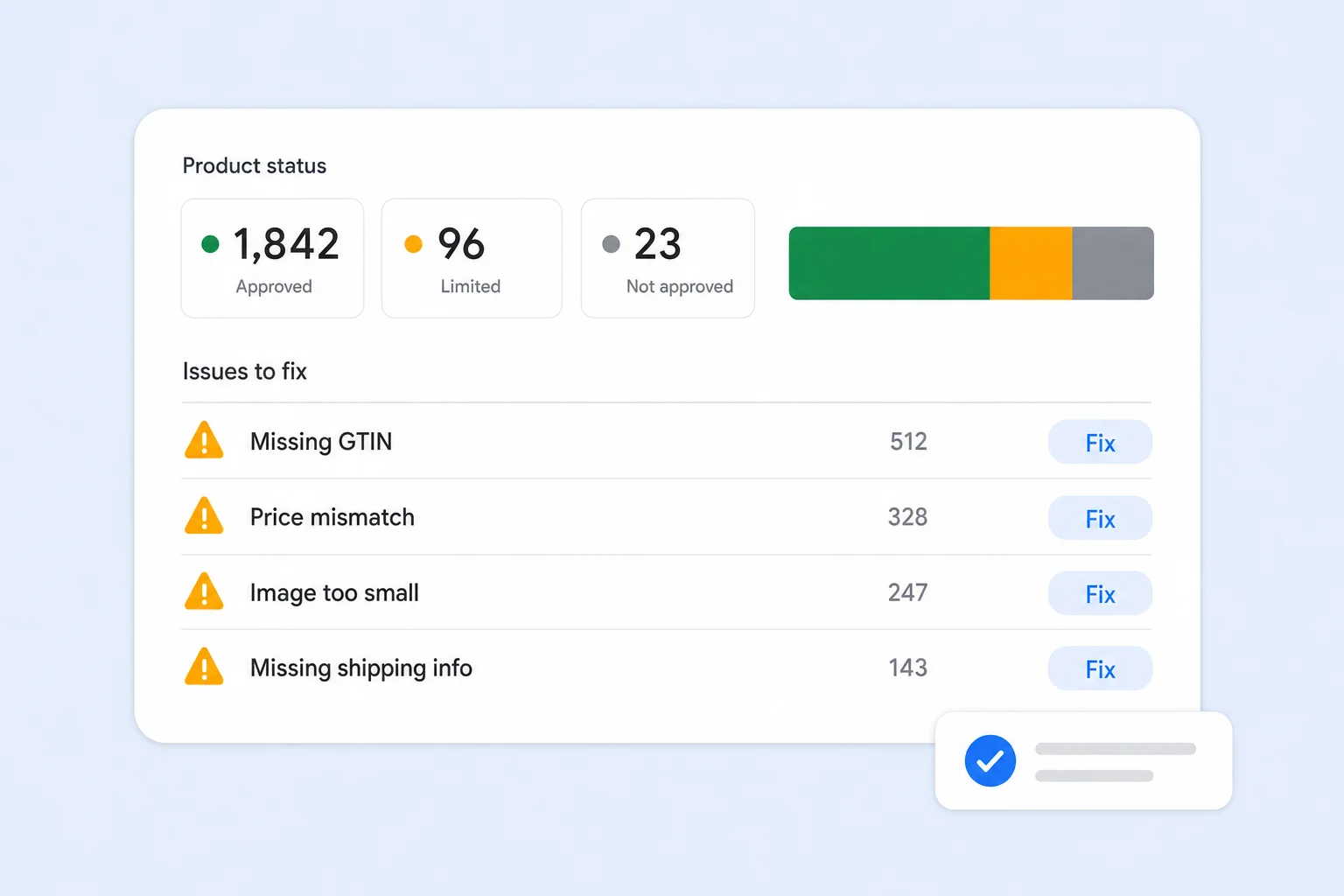
- Products that need attention: open the Products section in Merchant Center to see which items are not approved or limited, and why.
- Price and availability mismatches: the price or stock status in your feed must match your product page. Keep your feed synced and turn on automatic item updates.
- Missing or invalid identifiers: fix missing GTINs, brands, or incorrect identifier values.
- Image problems: images that are too small, have promotional overlays, or can't be crawled.
- Landing page errors: broken links, pages that don't load, or product pages blocked from Google's crawler.
- Policy and account issues: misrepresentation, missing return policy, or missing contact details can affect your whole account, not just one product.
Merchant Center usually explains each issue and how to fix it. Start with the issues that affect the most products or your best sellers.
Use Supplemental Feeds and Rules
You don't always need to change your website or ecommerce platform to improve your feed. In Merchant Center you can:
- Add a supplemental data source, such as a Google Sheet, to overwrite or add attributes like titles, GTINs, or custom labels.
- Create rules to clean up data automatically, such as adding the brand to the start of every title or setting a custom label based on price.
This is often the fastest way to fix hundreds of products at once without touching your store.
Common Feed Mistakes
- Titles that are too short or copied straight from the website menu.
- Missing GTINs on branded products.
- Promotional text or watermarks on images.
- Feed prices that don't match the website.
- Ignoring "limited" products because they aren't fully disapproved.
- Setting up the feed once and never reviewing it again.
Final Thoughts
Shopping feed optimization isn't a one-time task. Your catalog, your prices, and Google's requirements all change, and the stores that keep their feeds clean and complete get more out of every ad dollar.
At Uppertier Marketing, we offer shopping feed optimization for ecommerce brands, from rewriting titles and fixing Merchant Center issues to building custom labels for smarter bidding. If you want a second set of eyes on your feed, schedule a call with our team.


