
Vehicle Listing Ads (VLAs): How Google Vehicle Ads Work
How Google's vehicle listing ads work, what you need to run them, and how to set them up with Performance Max or Shopping.
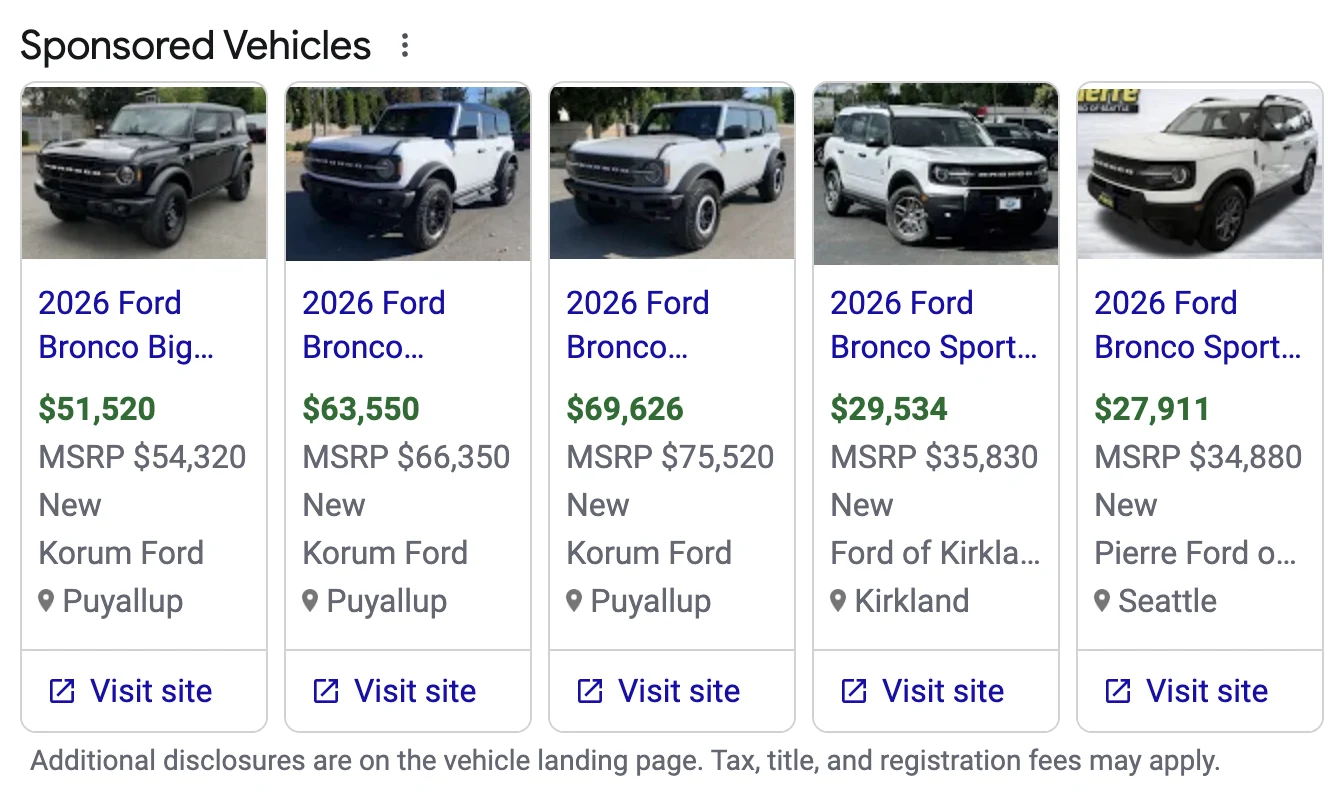
If you sell cars, trucks, or RVs, vehicle listing ads (VLAs) are one of the most valuable ad formats Google offers. Instead of a text ad, shoppers see a photo of the vehicle, the price, mileage or MSRP, the condition, and the dealership name and city, all right on the search results page.
Google now calls the format "vehicle ads." They run from a vehicle feed in Google Merchant Center and are served through Performance Max (PMax) or Standard Shopping campaigns. Because shoppers see the exact vehicle and price before they click, the leads they send tend to be further along in the buying process.
What Vehicle Listing Ads Show
Vehicle ads appear in a "Sponsored Vehicles" carousel on Google Search when someone looks for a specific make, model, or type of vehicle. Each card pulls its details straight from your inventory feed:
- Vehicle photo: the main image of that specific unit, not a stock photo.
- Year, make, and model: generated automatically from your feed.
- Price: the selling price, plus the MSRP for new vehicles in the US.
- Condition and mileage: new or used, with mileage shown for used inventory.
- Dealership and location: the advertiser name and city, pulled from your linked store locations.
Clicking a card takes the shopper to that vehicle's description page (VDP) on your website, where they can call, submit a lead form, or schedule a visit.
Who Can Use Vehicle Ads
Vehicle ads are built for dealerships, dealer groups, manufacturers, and auto marketplaces. Private sellers and brokers aren't allowed.
- Supported vehicles: new and used passenger cars, trucks, SUVs, and vans, plus recreational vehicles and travel trailers. ATVs and UTVs are supported in the US only.
- Not supported: commercial vehicles, farm equipment, motorcycles, boats, and buses.
- Countries: fully available in the United States, Canada, Australia, and Japan, and in open beta in the UK, Germany, France, Italy, Spain, and the Netherlands.
What You Need Before You Start
- Google Merchant Center: with your website verified and the Vehicle ads add-on turned on.
- Google Business Profile: linked to Merchant Center, with an accurate address, hours, and a unique store code for each dealership location.
- A vehicle feed: a file or API connection listing every vehicle in stock. Google doesn't build vehicle feeds by crawling your website, so most dealers use their inventory platform or a feed provider to send it automatically.
- Google Ads: linked to Merchant Center, with conversion tracking for calls, leads, and VDP actions.
Required Feed Attributes
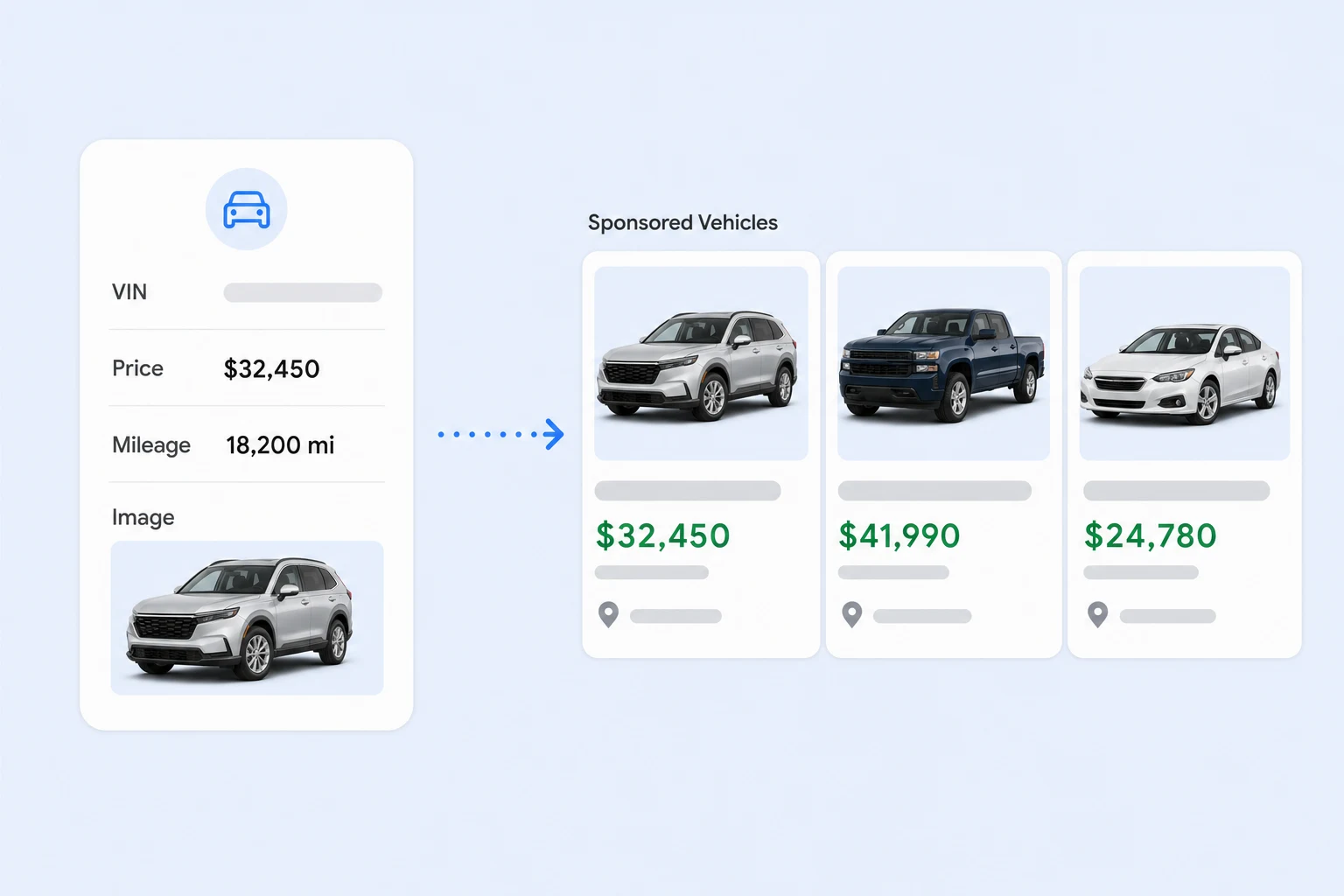
Your vehicle feed is what Google uses to match vehicles to searches, so it needs to be complete and accurate. The core required fields are:
- VIN and a unique ID (such as your stock number)
- Brand (make), model, and year
- Condition (new or used) and mileage
- Price, plus MSRP for new vehicles in the US
- Exterior color
- Main image link
- Store code and a link template to the VDP for in-store vehicles
- Vehicle fulfillment (in store or online)
- Google product category
Optional fields like trim, body style, engine type, vehicle options, and additional images aren't required, but they help Google match your vehicles to more specific searches. Custom labels let you group inventory by make, model, age on lot, or margin for bidding and reporting.
Landing Page Requirements
Google reviews your website before vehicle ads can run. Each VDP needs to show the following clearly when the page loads, without extra clicks:
- Dealership name and location
- Vehicle price that matches your feed, and MSRP for new vehicles
- VIN and, for used vehicles, mileage
- Availability, with no sold, reserved, or incoming units
Pages that show "call for price," sold vehicles, or prices that don't match the feed are common reasons vehicle ads get held up in review.
Performance Max vs. Standard Shopping for Vehicle Ads
Vehicle ads were originally available only through Performance Max. Google now also lets you run them in Standard Shopping campaigns, and you can run both together.
- Performance Max: uses Google's AI to show your inventory across Search and, with added assets, YouTube, Display, Gmail, Discover, and Maps. It can optimize for both online leads and store visits. If you attach only a vehicle feed with no other assets, your ads show only on Google Search.
- Standard Shopping: gives you more control over which inventory shows and how much you bid on each group, with clearer search term data.
Many dealers use Performance Max as the main driver and Standard Shopping to push specific inventory, like aged units or high-margin models.
How to Set Up Vehicle Ads
- Turn on the add-on: in Merchant Center, go to Settings, then Add-ons, and add Vehicle ads for your country.
- Link your locations: connect your Business Profile so each store code matches your feed.
- Upload your feed: create a vehicle data source and fix any errors Merchant Center flags.
- Pass the website review: confirm your VDPs meet the landing page requirements above.
- Build the campaign: create a Performance Max or Shopping campaign in Google Ads and select your vehicle feed.
- Track the right conversions: optimize for calls, lead forms, and store visits, not page views.
Best Practices
- Use real photos. Clear photos of the actual vehicle, shot from the front three-quarter angle, make a much stronger impression than stock or "coming soon" images.
- Update inventory often. Sync your feed at least daily so sold vehicles drop off and prices stay accurate.
- Upload your own video. If you add assets to Performance Max, include a real video so Google doesn't generate one automatically.
- Exclude low-quality placements. Use account-level placement exclusions to keep ads off irrelevant sites and apps.
- Segment inventory. Use custom labels to split new, used, and certified pre-owned inventory so you can set budgets and goals for each.
Common Mistakes
- Feed prices that don't match the price on the VDP.
- Sold vehicles still active in the feed.
- Store codes in the feed that don't match the Business Profile.
- Stock photos or missing images.
- Optimizing for page views or VDP views instead of calls and leads.
Final Thoughts
Vehicle listing ads put your actual inventory in front of shoppers at the moment they're searching for a specific vehicle. With a clean feed, compliant VDPs, and the right conversion tracking, they can become one of the strongest lead sources for any dealership.
At Uppertier Marketing, we set up vehicle feeds, Merchant Center, and Performance Max campaigns for dealerships so your inventory shows up for the right searches and turns into calls and visits. If you want to get started with vehicle ads, schedule a call with our team.


